
An employee completes a health check on time, but their reward never posts. How quickly can HR find the record, correct it and get the credit into the next payroll run? That handoff tells you more about prevention cloud than a tour of its dashboard.
If you’re considering prevention cloud, you need to know which tasks it takes off your team’s plate, what costs extra and who can see employee health data. The product documentation and a public contract offer a useful starting point for those decisions.
What is Prevention Cloud and How Does it Works?
Zomo Health’s prevention cloud, officially styled PreventionCloud, is an employee wellness platform. Staff can use it to find activities, register for events and check their progress. The employer and vendor set up eligibility, deadlines and rewards, including whether a credit ties into employee benefits. Zomo Health’s platform overview describes the tools employers can configure.
What employees do in prevention cloud
Say your company gives staff a credit for completing an annual checkup. An employee opens prevention cloud to find the visit form, then checks their activity status after submitting it. HR needs to know when a credit clears and how to send it to payroll. Ask to see that last step before you buy.
That workflow varies across employee wellness programs. San Mateo County’s 2026 benefits guide, for example, gives staff instructions for creating a prevention cloud account and completing an online assessment. Build your own guide around screenshots from your prevention cloud setup so staff can recognize the tasks and deadlines they see at sign-in.
Which prevention cloud features should you test?
A demo works best when it follows a task your employees already do. Ask the vendor to configure a sample activity in prevention cloud and show it from both the staff and administrator views.
| Task | What prevention cloud can support | What to verify in the demo |
|---|---|---|
| Health checks | A health risk assessment and visit forms | Show who reviews a submission and what happens if it is rejected. |
| Wellness challenges | Individual or team activities and progress tracking | Show how staff without a fitness tracker can participate. |
| Wellness incentives | Activity completion and reward tracking | Correct a missing credit and show how it reaches payroll. |
| Reporting | Participation and program reports | Export a sample report and explain which roles can see it. |
Test prevention cloud on staff devices
The iPhone listing describes visit forms, events and Apple Health integration. The Android listing describes optional Google Health Connect access to step counts. If prevention cloud will be your employee wellness app, test both the phones your staff use and the browser workflow.
Try signing in as a new employee, declining a device permission and submitting an activity without synced steps. Check what prevention cloud shows and who can fix any issues. If you need single sign-on, test it with your identity provider. For staff who work away from a desk, ask how they can access prevention cloud without a company phone or work email.
How much does prevention cloud cost?
Zomo Health invites employers to request a quote. The vendor pages reviewed do not give a standard prevention cloud price. A public agreement provides a concrete example of how portal access and services can be priced separately.
A public prevention cloud pricing example
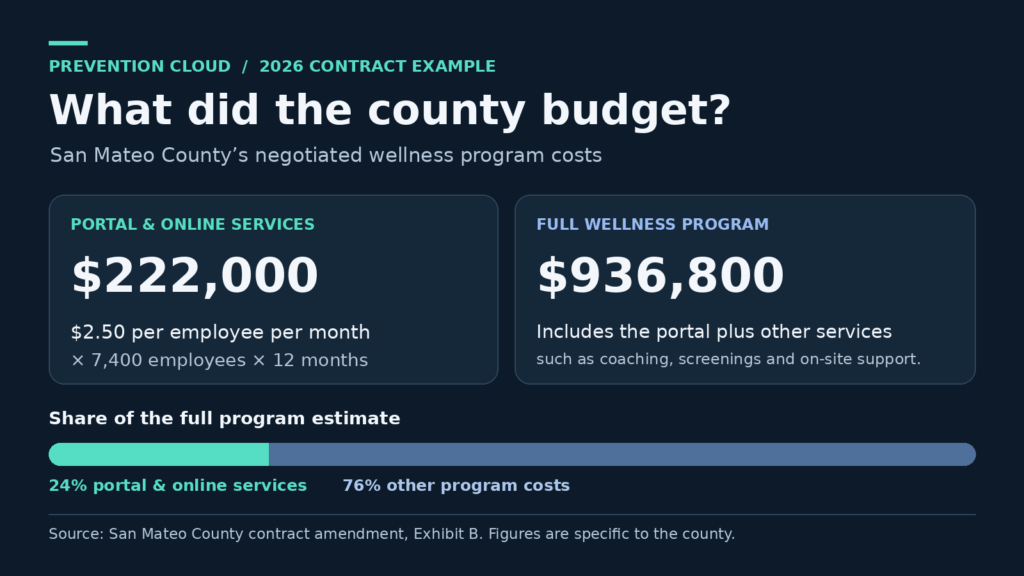
San Mateo County’s contract amendment lists $2.50 per employee per month for the prevention cloud portal and online services in its 2026 estimate. At roughly 7,400 employees, that’s $222,000 for the year. The same schedule estimates $936,800 for the full 2026 program, including separately priced services such as coaching, screenings and on-site support. These are negotiated figures for one employer.
For your prevention cloud quote, ask which people count toward the bill: eligible employees, enrolled employees or another group. Request separate amounts for setup, integration, health coaching, a biometric screening and rewards. Ask how fees change if your headcount grows or you renew.
Compare the total cost for the first year with the total cost at renewal. If a prevention cloud proposal bundles staffed services and a rival quotes only employee wellness software, have both price the same scope before comparing totals.
What can employers see in prevention cloud?
The prevention cloud privacy policy describes collection of health and employment information. Zomo Health’s terms distinguish between administrator and participant permissions. The county agreement calls for anonymized group reporting to its wellness staff. Ask for the access rules and sample reports that apply to your contract.
In a prevention cloud demo, have an employee submit a fictional assessment. Switch to the HR view and check whether staff can see the answers or only confirm completion. That distinction matters when the benefits team needs to approve a credit but has no reason to read an employee’s health answers.
Ask how prevention cloud handles reporting for very small teams, how long it keeps records and what happens when someone leaves. Even a group total can reveal who completed an activity if the group has two people. Ask whether you can set a minimum group size for reports.
If you’re an employee, check your program’s privacy notice before sending a form to prevention cloud or connecting a device. Ask who receives the data and whether you can take part without sharing it.
If you’ve connected the platform to a Google or Microsoft account, here’s how to review and revoke connected app permissions.
Where prevention cloud fits and where it falls short

Consider prevention cloud if your workplace wellness program needs one place to run recurring activities, track credits and report participation. If you only need an occasional team challenge, compare the cost and admin work with a simpler tool. For broader population health management, confirm which services are included and who provides them.
For larger corporate wellness programs, test how prevention cloud handles a worker who changes shifts, becomes eligible midyear or has a missing credit. In a short pilot, ask a sample of staff to finish one task on their own. Have the benefits team correct a missing record and reconcile the reward file.
Define employee engagement before rollout. San Mateo County counts a login plus one completed activity for its contract measure. In your prevention cloud pilot, if 80 of 100 eligible employees sign in and 60 finish the task, report 60% completion. The gap shows how many people got in but stopped before finishing. Check where they got stuck before adding more activities.
A completion rate in prevention cloud cannot establish savings. A randomized trial in JAMA of a separate program found improvements in some self-reported habits, with no significant difference in healthcare spending between groups after 18 months. Set a participation goal first and evaluate financial outcomes separately.
Conclusion
For employers juggling several activities and rewards, prevention cloud gives staff a place to see what’s due and HR a record to work from. The buying decision comes down to what the quote includes, what staff can do easily and how health data is handled. Before committing to prevention cloud, ask for an itemized quote and run one activity from employee sign-in through reward reconciliation.
Frequently asked questions
How do employees log in to prevention cloud?
Start with the link in your employer’s program guide. The prevention cloud sign-in page offers username retrieval and password reset. If your employer uses company sign-in, follow its instructions.
Is prevention cloud free for employees?
The iPhone app is free to download. Access to an organization’s prevention cloud program depends on its eligibility rules. Employers should request a separate quote for software and services.
Can I use prevention cloud without a wearable?
Ask which activities your employer accepts. If a prevention cloud challenge counts synced steps, check whether manual entry or another activity can earn the same credit before joining.
Does prevention cloud set the rewards?
Your employer’s program determines eligible activities, deadlines and rewards. If a credit is missing from prevention cloud, check the program rules and ask who verifies completion.
