
An AI can produce a polished task list that forgets every item on reload. Add one task and refresh the page to see what you actually got. That’s where vibe coding gets useful. Your next prompt can address a specific failure.
This guide takes you through a small task list you can run in your browser. You’ll get a prompt to copy, a complete example to inspect, and a test checklist for the details a good-looking preview can hide.
What is Vibe Coding?
Vibe coding is a way to build software by describing what you want in plain language, letting an AI write the code, and refining the result after you try it. The main activity is the feedback loop. You ask for one behavior, see what happens, and use what you observe to guide the next change.
Vibe coding meaning and origins
In February 2025, Andrej Karpathy described a hands-off way to build small projects, relying on the assistant and paying little attention to the generated code. This build keeps the quick feedback loop and adds checks so you can explain what the app does with your data.
Describe something you can test
“Make me a better task app” gives the tool a lot to guess. “After I add a task, clear the field and put the cursor back in it” gives you something you can check in seconds. A request like that also makes the next edit easier to review because you know which behavior you asked the tool to change.
Pick a tool and keep the first app small
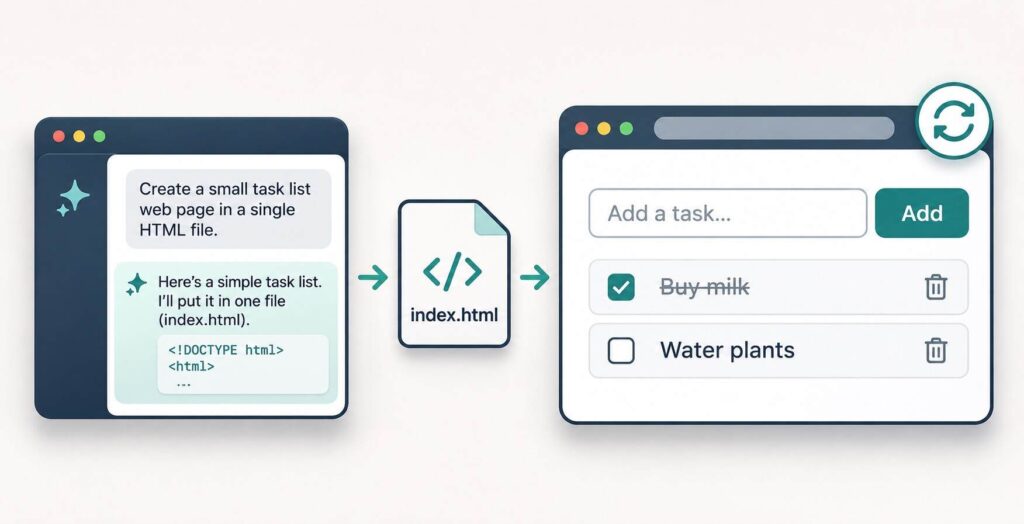
A one-file task list is a good first vibe coding project. You can check every important action in a few minutes. Write down what version one needs to do. For this app, you can add a task, mark it complete, delete it, and keep the list after a reload. Use sample tasks such as “Buy milk” while you learn.
If you use ChatGPT, ask it to return the complete file and save it in a text editor. If you already use Claude Code or Cursor AI, work in a dedicated folder and ask the agent to create the file there. GitHub Copilot in Visual Studio Code is another option if you have it set up. Review the proposed edits and understand any command before approving it.
A hosted builder such as Lovable AI can help when your goal is a visual prototype. For this exercise, choose a workflow that gives you one editable file you can open locally.
Build your first task list
Start with this vibe coding prompt
Create a small browser task list in one file called
index.html. Put the CSS and JavaScript in that file and use browser-native features only. Include a labeled task field and an Add task button. Let me press Enter to add a task, mark it complete, and delete it. Trim spaces from task names and show a message for blank input. Save tasks and completion status inlocalStorage. If saving fails, show a warning and let me keep working in the current session. Render task names withtextContentand keep controls reachable by keyboard. Return the complete file and briefly explain what it stores.
Before running the result, search the file for localStorage. Find where the script saves tasks and where it loads them when the page opens. If the response asks you to install packages, ask for the single-file version. The companion file, vibe-coding-task-list.html, is a working reference you can inspect or start from.
Open the app on a local address
Save the result as index.html in a dedicated folder. If you’re using the companion file, rename a copy to match. Open a terminal in that folder. With Python 3 installed, enter the command below in your terminal.
python -m http.server 8000 --bind 127.0.0.1If your system uses python3, substitute it in the command. Open http://127.0.0.1:8000/ in your browser. The server listens on your computer’s loopback address. Keep the terminal open while you test and press Ctrl+C there when you’re finished.
An editor’s local preview also works. Use the same browser profile and address, including the port, when checking saved tasks. The browser keeps storage separate by origin, and directly opened files can behave differently across browsers.
Request one change at a time
Suppose the task gets added but the old text stays in the input. Save a copy of the working file, then ask for a fix you can verify.
After a valid task is added, clear the input and return keyboard focus to it. Change only the form submission handler. Tell me how to test that change.
Reload and try adding two tasks in a row. Then check completion and deletion again. If the edit introduces a new problem, restore your saved copy and describe the failing step. That’s a practical way to keep a vibe coding session from turning into a series of larger rewrites.
Test the app before you trust it
A useful vibe coding test starts with an action and an expected result. Run the checks in the table in your browser, then repeat them after a change. Use a fresh test list so you can tell which actions create or remove an item.
| Try this | What should happen |
|---|---|
| Submit three spaces | The app asks for a task name and leaves the list empty. |
Type Buy milk and press Enter | One task appears, the field clears, and focus returns to it. |
| Mark the task complete and reload | The task is still checked. |
| Delete the task and reload | The deleted task stays gone. |
Add <b>Test</b> as a task | The brackets appear as text and the word stays unformatted. |
| Use Tab to move between controls | The input, checkbox and buttons show visible focus. |
The angle-bracket check helps you see how the app treats input. In the companion file, textContent displays the task name as plain text. That matters because treating user input as page markup can create a security problem.
I checked the companion script with simulated form and storage tests for blank input, completion and deletion after reload, literal text, and blocked storage. Use the table to verify keyboard behavior and layout in your browser. If tasks disappear after a reload, compare the address with the one you started on and check for a storage warning.
Know when vibe coding needs a closer review
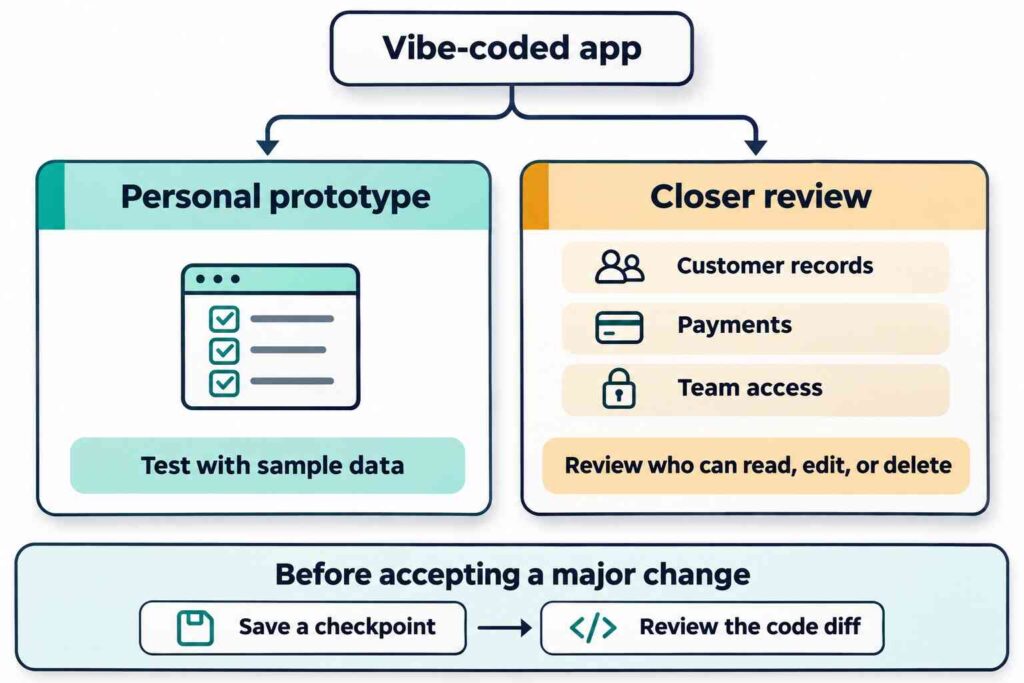
Vibe coding works well for a disposable prototype or a small personal tool. Before you put customer records, payments, or team access into an app, write down who should be able to read, edit, and delete each record. Have someone review how those permissions are enforced and use sample data for the first round of tests.
Save a dated copy or a Git checkpoint before each substantial edit. Then review the diff, which shows what changed between versions. If you’re using Git, see how to test and review changes made by Claude Code before committing them. If a request to fix a button also adds a dependency or introduces a network request, ask why it’s needed before you accept the patch. Leave passwords and API keys out of your AI prompts and any files sent to the browser.
Conclusion
Vibe coding can get you to a working draft quickly. A small app gives you room to check what it saves, what happens when it fails, and what each change does. Run the task list through the checklist first. Then try one improvement, such as a filter for completed tasks, and repeat the same tests.
Frequently asked questions
Can I try vibe coding without knowing how to code?
Yes, for a small prototype. Ask the tool to show you where the form handles input, where the list updates, and where data is saved. Read those three parts alongside the running app so you can tell whether the explanation matches what you see.
Will my tasks move to another device with the file?
Copying the file moves the app. Saved tasks stay with the browser profile and address where you entered them. If you need to move the list later, make export and import your next features and test them with sample data first.
Can I publish an app made with vibe coding?
Yes. A static host such as GitHub Pages can serve a one-file project like this. Each visitor gets a separate list stored in their browser. A shared list would need shared storage and a way to control who can access it.
What should I tell the AI when the app breaks?
Give it the steps to reproduce the problem, what you expected, and what happened. If the browser console shows an error, copy the first relevant one after removing any private information. Ask for one small fix and rerun the checks that already passed.
