
A refurbished iPad can save you $90 compared with the same model new and still cost more than a new one with less storage. The right choice depends on how much space you’ll use.
This guide to Apple refurbished devices explains what Apple tests, how the warranty works and when a Mac, iPad, iPhone or watch is a good buy. The policy examples use Apple’s U.S. store. Check your regional store for local terms.
How Apple refurbished devices are prepared
Apple inspects, cleans and fully tests each device in its Certified Refurbished program before resale. Apple uses genuine replacement parts where needed. The device ships in a white box, and the product listing shows which cables and accessories come with it.
Apple includes a new battery and outer shell with its certified iPhone and iPad models. If you buy an Apple refurbished Mac or watch, check the individual listing and test the battery while you can still return the device. Start with a normal day of use so you can judge the runtime against your needs.
Warranty and returns on Apple refurbished purchases
What the one-year warranty covers
Apple refurbished products sold through the certified program carry Apple’s standard one-year limited warranty for defects in materials and workmanship under normal use. If you want accidental damage protection, check which AppleCare plan the device qualifies for. Compare the plan price and any service fees before adding it.
How long you have to return it
The standard U.S. return window for an eligible Apple refurbished order is 14 calendar days from the day you receive it. Apple may give you more time to return qualifying holiday purchases. Check the deadline on your order and keep the box, cords and other included items until you decide to keep the device.
Which Apple refurbished devices are worth buying?
Start with the job the device needs to do. A lighter laptop makes sense if you carry it daily. A pricier model can earn its keep if it cuts the time you spend on repeated exports or builds.
| Device | Good fit | What to check before buying |
|---|---|---|
| Apple refurbished MacBook Air | Writing, calls, spreadsheets and travel | Match memory and storage to the apps and files you use. |
| Apple refurbished MacBook Pro | Long video exports, large builds or demanding desk setups | Confirm the chip, ports and external display support. |
| Apple refurbished iPad | Reading, note-taking or drawing in Procreate | Check storage, screen size and Apple Pencil compatibility. |
| Apple refurbished watch | Notifications, workouts and activity tracking | Check case size, band fit and whether you need cellular service. |
| Apple refurbished iPhone | A lower-cost upgrade that covers the features you use | Check storage, carrier support and the exact model. |
If you plan to use a MacBook Pro docking station, check which displays the Mac and dock support together. Two laptops with the same screen size can have different native display limits.
Is Apple refurbished worth it?
Yes, if the device does what you need and costs meaningfully less than a comparable new one. Check current offers at Apple, Best Buy or another retailer for the same chip, memory and storage. If a newer model costs about the same, compare the software it supports and the features you’ll use.
What the price difference looks like
On November 7, 2026, Apple’s U.S. store listed an Apple refurbished 256 GB iPad (A16, Wi-Fi) for $459 and the same configuration new for $549. That’s $90 in savings before tax. Apple also listed the 128 GB version new at $449. If you’re replacing an iPad, open Settings → General → iPad Storage to see how much space you use before paying for more.
If you’re buying Apple refurbished units for a team, check whether Apple has enough of the same configuration. Matching models can simplify setup and support. Price the whole order, including accessories, before committing to a mix of devices.
What to check before and after you order
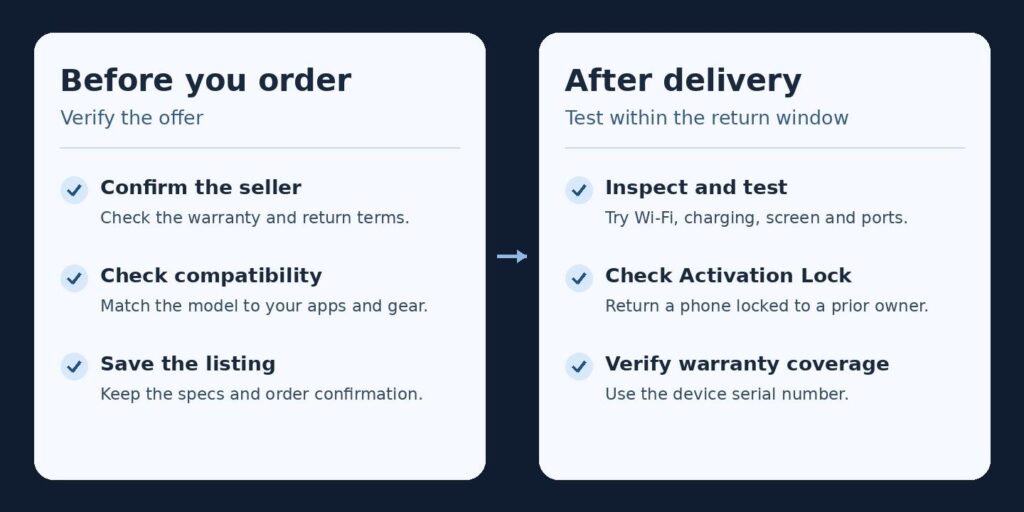
- Confirm the seller. Start at the Apple refurbished store on apple.com. If you’re also looking at used iPhones for sale on Back Market, compare the condition grade, battery policy and return terms. Sellers of refurbished phones set their own warranty terms, so confirm who handles claims. During setup, check for Activation Lock. If setup asks you to sign in with the previous owner’s Apple Account, return the phone. If you’re unsure what the setup screen means, see what to do if Activation Lock appears.
- Save the listing and order confirmation. Record the model and configuration. Use the exact model to check compatibility with your work apps, operating system and accessories. If there’s a discrepancy after delivery, you have the original listing to refer to.
- Test what you use most. Set up your Apple refurbished device while there’s time to return it. Check Wi-Fi, charging, the screen and any ports you depend on. On a Mac, connect your usual monitor or run a project you work on often. Use the serial number to check your Apple warranty coverage.
Conclusion
An Apple refurbished purchase makes sense when the device fits your needs and the discount holds up against current prices. Pick one listing, compare the full cost with the equivalent new model, and check the warranty and return window before ordering.
Frequently asked questions
Does Apple sell refurbished iPhones?
Yes. Apple’s U.S. online store sells certified models, and stock changes over time. If you see an iPhone 15 Plus, check the storage and unlocked status. Before transferring your number, use your carrier’s IMEI lookup to check that it can activate on your plan.
Are refurbished Apple Watches good?
Yes, if the model pairs with your iPhone and the battery lasts through a typical day for you. On the Apple Watch, open Settings → Battery → Battery Health to see maximum capacity. If you want to take calls away from your phone, check whether the watch and your carrier support a cellular plan.
Can I customize an Apple refurbished Mac?
Choose from the configurations Apple has listed. If you need more memory or storage, look for a matching listing or price a new Mac with that configuration. Check the chip and memory in the listing even when the product name looks familiar.
Do refurbished devices get software updates?
Yes. Update compatibility depends on the exact model. If you’re buying an older device for work, look up the latest operating system that model supports and compare it with the minimum version your essential apps require.
