
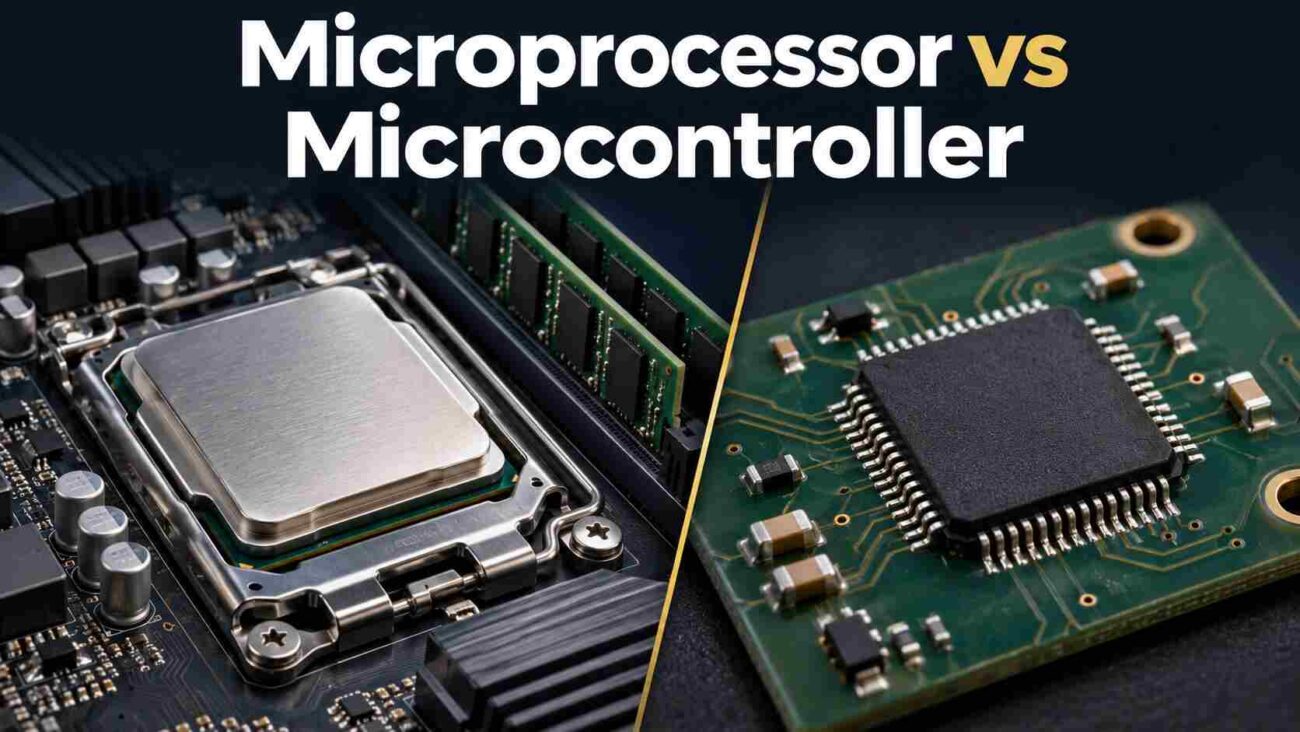
Choosing a chip by its speed rating can leave you with unnecessary hardware, short battery life, or software that will not fit. The difference between microprocessor and microcontroller matters because each approach solves a different design problem. A temperature sensor and a touchscreen control panel may share a network, yet need very different computing hardware.
A useful microprocessor vs microcontroller comparison starts with what your device must do. Here are seven differences that help you choose, including the exceptions that make simple comparison charts misleading.
The short answer: A microcontroller combines a processor, working memory, and control interfaces for dedicated tasks. A microprocessor emphasizes computing capability and commonly relies on external working memory and storage. Modern designs overlap, so check the actual device specifications.
Use this table to compare microprocessor and microcontroller designs at a glance:
| Difference | Microcontroller: typical approach | Microprocessor: typical approach |
|---|---|---|
| Integration | Processor, RAM, and control peripherals together | Processing cores with varying integrated hardware |
| Memory | Limited internal RAM; program storage varies | Larger external RAM and storage |
| Performance | Efficient sensing and control | Demanding applications and graphics |
| Software | Direct firmware or a small operating system | Often Linux or another full operating system |
| Timing | Suited to predictable hardware responses | Depends on architecture and software |
| Energy | Often designed for extended sleep | Generally greater system energy needs |
| Cost | Often fewer supporting components | May require more supporting hardware |
- 1. Integration: What Comes on the Chip
- 2. Memory: A Fixed Budget or Room to Grow
- 3. Performance: Match the Workload
- 4. Software: Firmware or a Larger Operating System
- 5. Timing: Predictable Control Versus Throughput
- 6. Energy Use: Measure the Whole Device
- 7. Total Cost: Count More Than the Chip
- Frequently Asked Questions
- Conclusion
1. Integration: What Comes on the Chip
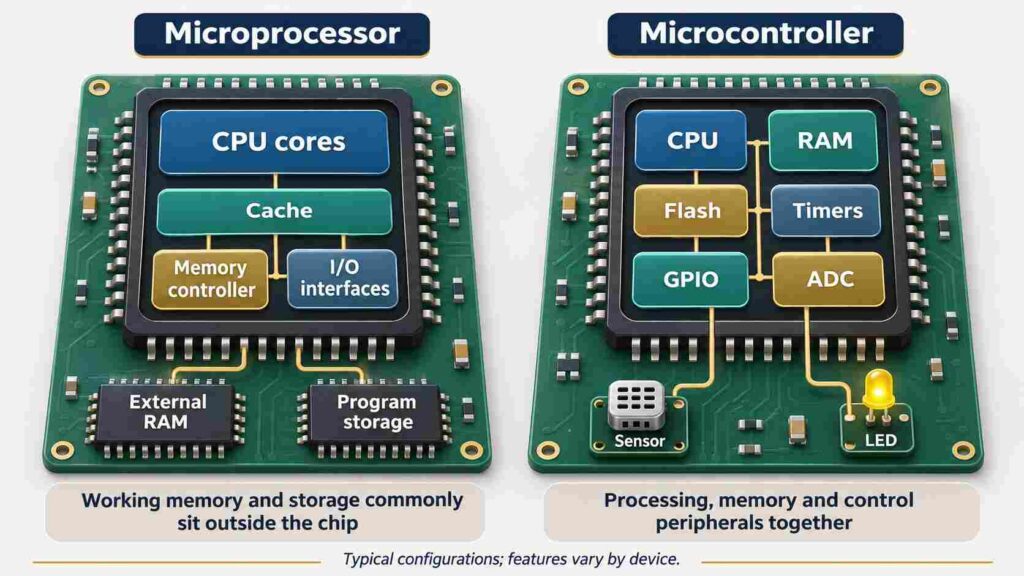
Both contain a central processing unit, which executes instructions. An MCU typically adds RAM, timers, and input/output peripherals for reading signals and controlling hardware.
The difference between microcontroller and microprocessor is therefore about the wider device, not whether it contains a CPU. Both serve embedded systems: computers built into products to perform particular functions.
The microcontroller vs microprocessor choice starts with your connections. List the sensors, buttons, displays, and communication interfaces you need. Then check whether the chip provides them and whether enough usable pins remain.
An MPU can integrate substantial hardware too. Avoid treating it as a bare CPU with nothing else inside.
2. Memory: A Fixed Budget or Room to Grow
Many MCUs include flash memory for program storage alongside internal RAM. That arrangement simplifies small products, but available space can become a constraint.
There are exceptions. Raspberry Pi documents that RP2350A and RP2350B lack built-in program flash and can execute code from external storage. External program memory does not automatically make a device an MPU.
MPU designs commonly support much larger external working memory. That helps with large images, complex applications, and substantial data buffers.
For a practical desktop example, see how DDR5 memory compatibility and the processor’s memory controller can affect stability when adding RAM.
Before choosing, estimate code size, temporary data, display buffers, and update requirements. Leave space for likely growth; adding features later is harder when memory is already full.
For example, a 320 × 240 image using two bytes per pixel needs 153,600 bytes for one full frame buffer, before application data. Small screens can therefore use more RAM than beginners expect.
3. Performance: Match the Workload
An MPU often offers more resources for demanding applications, but clock speed alone cannot settle a microcontroller vs microprocessor comparison.
Architecture, memory access, accelerators, and software all affect useful performance. A modest MCU may comfortably read a sensor and adjust a fan, while a richer interface with video and several applications can justify an MPU.
ST describes demanding graphics and large-memory workloads as reasons to consider an MPU, while capable MCUs increasingly handle simpler graphical interfaces.
Test the slowest important operation using representative data. A successful demonstration with tiny inputs does not establish that the finished application has enough processing capacity.
4. Software: Firmware or a Larger Operating System
MCUs can run firmware directly, without an operating system. More involved applications may use a real-time operating system to organize tasks and scheduling.
Many application-oriented MPUs support Linux and larger software stacks. A memory management unit, common in these processors, supports facilities such as virtual memory and process isolation. Neither feature should be assumed from the product label alone.
Start with software dependencies. If your application needs an existing Linux package or a desktop-style interface, verify that support before buying hardware.
Also consider maintenance: boot configuration, drivers, updates, and recovery procedures can take more effort than writing the main application.
5. Timing: Predictable Control Versus Throughput
Fast processing and dependable response times are different requirements. A motor controller must deliver a control update before its deadline, even while other work is happening.
For microcontroller vs microprocessor timing, ask how late a response may arrive. MCUs often offer timers, interrupts, and specialized control hardware suited to predictable responses. ST’s control-focused MCU range combines signal conversion, timers, and processing for these workloads.
An MPU can also meet timing requirements with suitable hardware and software. An MCU can miss deadlines if its firmware blocks important work.
Measure response time under the busiest expected conditions, rather than assuming either category guarantees it.
Some products use both approaches: an application processor handles the screen and networking, while an MCU handles time-sensitive control. Some chips combine application and control cores. This division can suit a machine that needs a graphical interface and dependable motor operation.
6. Energy Use: Measure the Whole Device
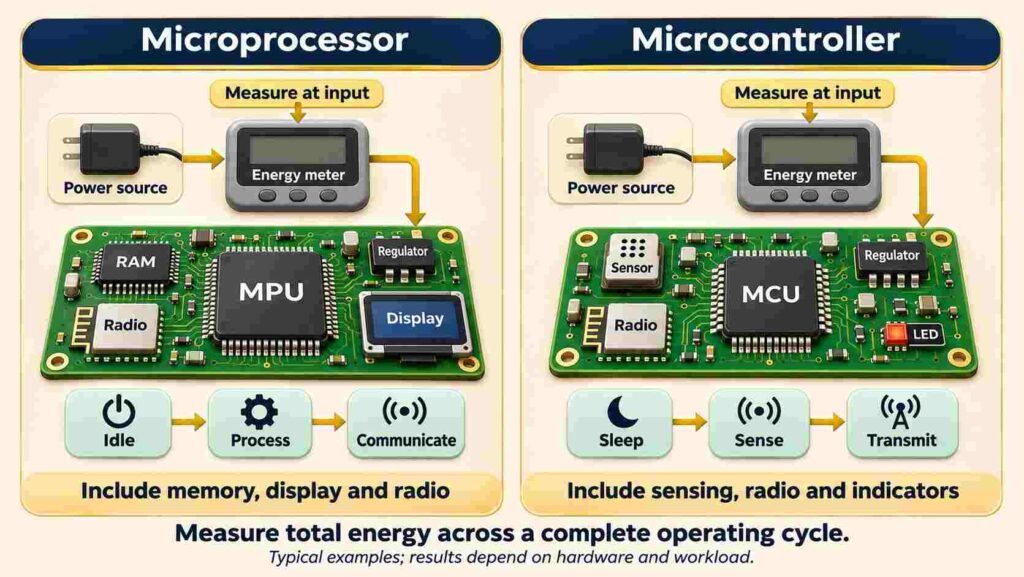
For battery-powered equipment, power consumption matters across the full operating cycle.
A wireless Internet of Things sensor might spend most of its time sleeping. Its battery life depends on sleep current, wake-up overhead, sensing, and radio transmissions.
Texas Instruments explains why averaging active and inactive periods gives a more useful energy picture than reading an active-current figure alone.
MCUs often suit this pattern, but the complete board matters. Regulators, indicator lights, external memory, and communication hardware also draw current.
Measure at the power input using your intended workload. A low chip-level sleep figure does not establish finished-product battery life.
7. Total Cost: Count More Than the Chip
The final microcontroller vs microprocessor decision should reflect the complete product.
Count memory, power circuitry, board complexity, assembly, debugging, and ongoing software support. An MCU often reduces supporting hardware. An MPU module can simplify development by packaging difficult components together, although its purchase price may be higher.
A Practical Selection Check
Write down your minimum memory, required interfaces, response deadline, energy budget, and software dependencies. Shortlist devices that satisfy every requirement before comparing prices.
For a one-off prototype, development time may matter more than component savings. For production, assess both engineering effort and the cost per finished unit.
Frequently Asked Questions
Can a microcontroller run multiple tasks?
Yes. Firmware can switch between tasks, and an RTOS can schedule them. Some MCUs also have multiple cores. Available memory and timing requirements determine what is practical.
Does a microprocessor always need an operating system?
No. Suitable MPUs can run firmware directly. Linux is common in application-oriented products, but it is a software choice rather than a universal requirement.
Is Raspberry Pi a microcontroller or a microprocessor?
The product matters. Pico boards use microcontrollers. Raspberry Pi single-board computers, such as Pi 5, use an application processor within a larger chip and run systems such as Linux.
Is microcontroller programming easier for beginners?
A development board with clear tutorials can make small hardware projects approachable. Choose a supported board and start with one input and one output. Tool quality matters more than the category alone.
Conclusion
The difference between microprocessor and microcontroller comes down to matching resources to a job. MCUs often suit compact control devices; MPUs often suit larger applications and memory needs. Write your requirements, check candidate datasheets, and test the hardest workload before committing. That small exercise is more useful than choosing whichever chip looks fastest.
