
Good care deserves a clear record—not a trail of login errors and unanswered questions. For Louisiana care providers and workers, LaSRS login is an entry point to the state’s electronic visit verification system. Learn how to access the official LaSRS portal, sign in from your phone, and handle common login problems—while protecting your credentials and keeping visit records accurate.
What Is LaSRS?
Your shift is starting, someone is relying on your care, and the last thing you need is a confusing sign-in page. A reliable LaSRS login starts with knowing which system you’re using—and which website is genuine.
LaSRS means Louisiana Service Reporting System, managed by Statistical Resources, Inc. for the Louisiana Department of Health (LDH). Its electronic visit verification (EVV) component records service visits, including who provided care, who received it, location, date, and start/end times.
Think of it as a service-verification tool, not a guarantee that a claim has automatically been approved.
Start With the Official Portal—Not a Lookalike
The official LaSRS login page is lasrs.statres.com. If you searched for “lasrs statres login,” check that exact hostname before entering anything.
For safer access, save a verified bookmark. Search ads, copied logos, and a padlock alone do not prove a website is genuine. Do not disclose your password to any unauthorized support agency.
Protect client information, too. If you need help, describe the error without posting passwords, client names, or care details in public forums. Use your employer’s approved support channel for sensitive records.
How to Complete Your LaSRS Login
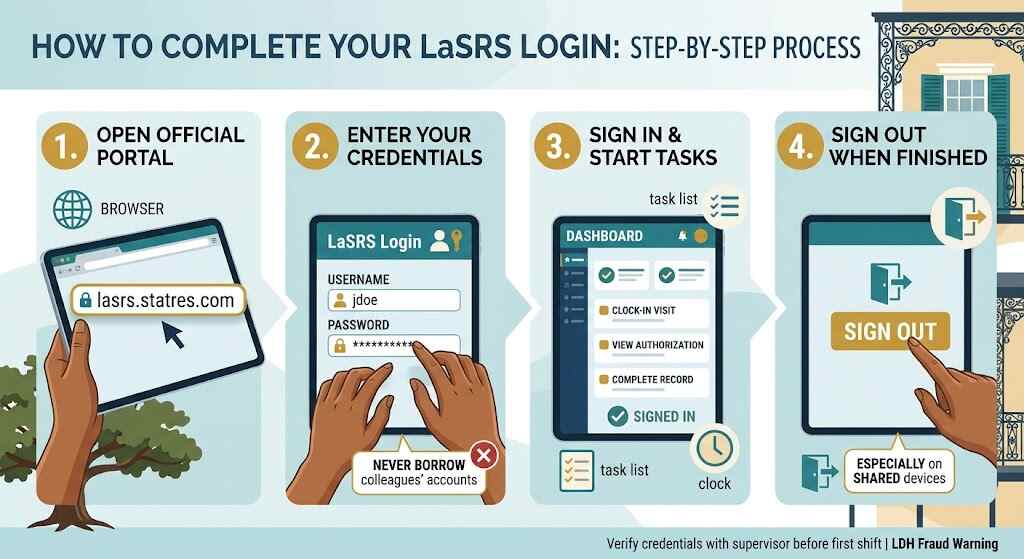
- Open the official address in an internet-connected browser.
- Enter your own credentials, as supplied by your provider.
- Sign in and follow your provider’s instructions for your assigned tasks.
- When finished, sign out—particularly on a shared device.
Before your first shift, ask your supervisor to confirm your LaSRS login works and demonstrate the correct clock-in/out process. A short supervised practice session beats discovering an access problem at a client’s door.
Never borrow a colleague’s account. LDH treats logging in as the user’s signature and identifies using somebody else’s credentials as fraudulent.
LaSRS Login App: Know Your Mobile Route
LDH says the system can be accessed using an internet-connected computer, smartphone, or tablet.
Searching for a LaSRS login app should not lead you to an unverified download. Ask your provider which route to use: the state system or an approved third-party EVV system. Louisiana permits integrated third-party systems, but that does not make every similarly named app official.
For agencies using third-party software, the 2026 policy requires an annual provider attestation, or a new one when ownership or the executive director changes. The selection of apps is a compliance issue—not a mere download.
LaSRS Login Not Working? Separate the Problem
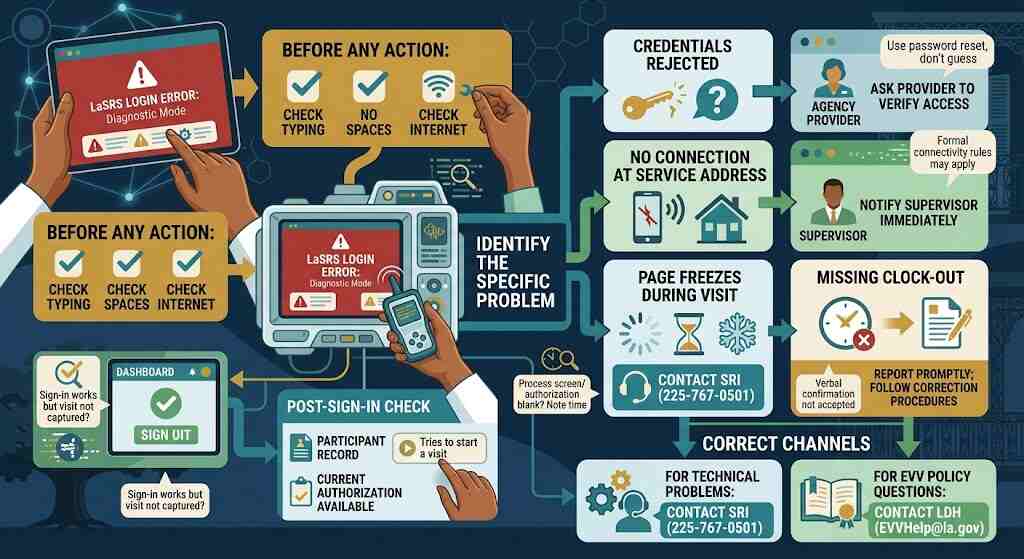
Check typing, accidental spaces, and your connection. In the case of a password reset for LaSRS, use your agency’s instructions for doing so, and don’t continue to guess passwords.
LDH’s published home-health FAQ acknowledges “still processing” messages and blank authorization screens. It instructs users to reach SRI immediately at 225-767-0501.
| Situation | Practical next step |
|---|---|
| Credentials rejected | Ask your provider to check your access. |
| No connection at the service location | Notify your supervisor; formal connectivity rules may apply. |
| Page freezes during a visit | Note the error and time; contact SRI. |
| Missing clock-out | Report promptly; follow documented correction procedures. |
After Sign-In, Protect the Visit Record
A successful LaSRS login is only the beginning.
If you can sign in but cannot capture a visit, ask your provider to check the participant’s record and authorization status. For services requiring prior authorization, LDH says a current authorization must be available in the system before electronic capture.
LDH’s March 2026 EVV policy requires supporting documentation for manual entries and edits. Verbal confirmation of missing or additional time is not acceptable.
Illustrative example: A caregiver finishes a visit but cannot record departure because the connection fails. Notify the supervisor immediately and preserve the actual departure time for the required documentation—not an invented time entered later.
For persistent lack of connectivity at a service address, LDH requires a supervisor or provider designee—not the worker—to complete its connectivity test. A broken phone or exhausted data allowance is not a valid reason for that form.
Frequently Asked Questions
1. Is LaSRS login free?
LDH says the state system is provided at no cost to providers; obtaining a suitable smart device is the provider’s responsibility.
2. Can I use LaSRS login on my phone?
Yes. LDH describes access from internet-connected smart devices. Follow your agency’s device and security instructions.
3. Does LaSRS track me all day?
No. LDH says LaSRS collects location at clock-in and clock-out, rather than continuously tracking workers or participants.
4. What if I forget to clock out?
Tell your supervisor promptly. Corrections need documented reasons and supporting evidence under LDH policy.
5. Who answers EVV policy questions?
Contact LDH at EVVHelp@la.gov for policy guidance; contact SRI for the technical problems described above.
Conclusion: Make Every Sign-In Count
The best LaSRS login routine is simple: use the genuine portal, keep credentials private, and check that visits are recorded accurately. If something fails, report it early instead of improvising. Those habits protect more than a dashboard—they support reliable care, trustworthy records, and fewer avoidable problems for the people depending on you.
