
You search a company name, click the first result, and land on a page that looks right but feels slightly off. The logo is blurry, the domain has an extra hyphen, and the “Contact Sales” form asks for card details. That moment of doubt is why knowing how to find a target company URL matters. Sales reps, job seekers, and finance teams all depend on the right target company URL. If you get the URL of your target company wrong, then everything you do is built upon a false premise.
- What a Target Company URL Actually Means
- Why Speed Without Verification Backfires
- Five Proven Ways to Find a Company Domain Fast
- Quick Comparison: Which Company Website Lookup Method Fits You?
- Practical Scenarios Where the Right Target Company URL Mattered
- Red Flags That Signal a Fake Corporate Site
- Frequently Asked Questions
- Conclusion
What a Target Company URL Actually Means

A target company URL is the verified, official web address of the organization you are researching. It is not a reseller website, reviews list, or parked domain with the same name. Think of it as the company’s official front door. Directories, ads, and social posts are just signposts pointing toward the target company URL, and signposts can be faked.
Why Speed Without Verification Backfires
In December 2022, the FBI’s Internet Crime Complaint Center (IC3) warned that criminals bought search ads that impersonated real brands and redirected users to lookalike sites. IC3’s yearly reports also rank business email compromise among the costliest cybercrimes, with losses in the billions. Many of those schemes start with a domain one letter away from the real target company URL.
Five Proven Ways to Find a Company Domain Fast
1. Ignore the advertisements and view the knowledge panel. Scroll past sponsored results and open the company’s knowledge panel, which usually shows a “Website” button linking to the target company URL.
2. Use official filings. For US public companies, SEC EDGAR filings and investor relations pages confirm the genuine target company URL. Wikidata also lists official websites for many organizations.
3. Cross-check verified social profiles. A LinkedIn company page with thousands of employees should list the same target company URL you found. If they don’t match, dig deeper.
4. Run a domain lookup. ICANN’s free Lookup tool shows when any claimed target company URL was registered. A domain created three weeks ago for a firm claiming 40 years of history is a red flag.
5. Use an official website finder for bulk lists. CRM enrichment tools help you find a company domain for hundreds of names in minutes. Still, spot-check samples, because common names can return the wrong target company URL.
Quick Comparison: Which Company Website Lookup Method Fits You?
| Method | Best For | Speed | Reliability | Watch Out For |
|---|---|---|---|---|
| Knowledge panel search | Immediate simple tests | Seconds | High | Sponsored lookalike ads |
| SEC Edgar / registers | Public or regulated firms | Minutes | Very high | Not every firm files |
| Social sites / LinkedIn | Cross-validation | Seconds | Medium-high | Fake or outdated pages |
| ICANN domain lookup | Spotting new fake domains | Seconds | High for age | Privacy-redacted owners |
| Website searching tools | Bulk lead lists | Minutes | Medium | Name collisions |
Practical Scenarios Where the Right Target Company URL Mattered
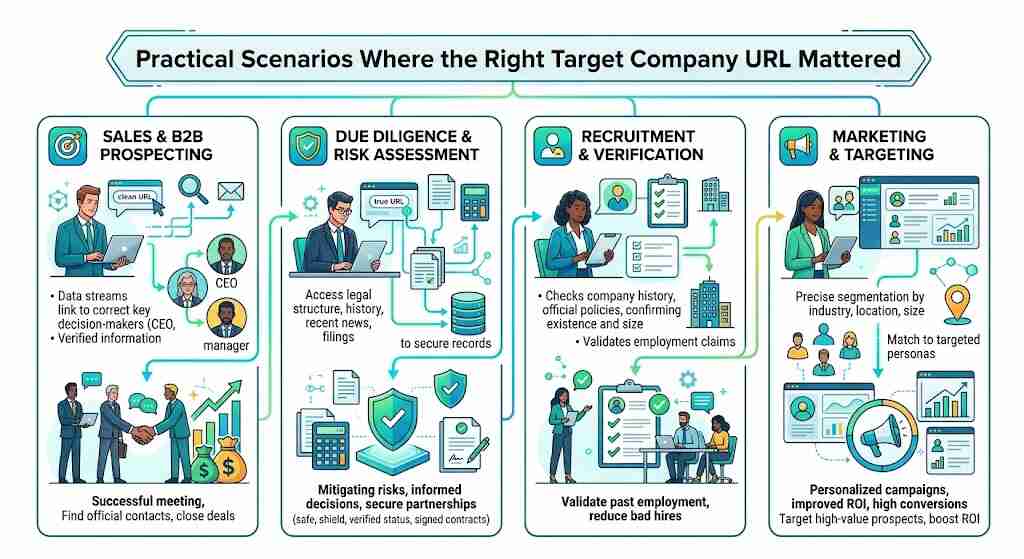
The name-collision problem. Picture a team enriching 500 leads by name alone. “Apex Solutions” can match dozens of unrelated businesses. Adding a city or registration number to each company website lookup ties every lead to the correct target company URL and cuts bounced emails.
The invoice that almost went out. A familiar finance story: a supplier email arrives with “updated bank details,” but the domain swaps an “l” for a “1.” Comparing it against the saved target company URL stops the payment.
The too-good job offer. The FTC regularly warns about fake recruiters. Before sharing documents, job seekers should confirm the opening appears on the careers page of the verified target company URL.
Red Flags That Signal a Fake Corporate Site
- Extra words or hyphens, such as “brand-support-login”
- A very recent registration date
- An address that doesn’t match official filings
- Pressure to pay, download, or log in immediately
Frequently Asked Questions
What is a target company URL?
The official, verified website address of the organization you’re researching.
What is the fastest way to find a company domain?
Skip sponsored ads and use the knowledge panel’s website link.
Can I trust an official website finder tool?
Mostly, but spot-check results for common company names.
How do I confirm that the target company URL is legitimate?
Match it across filings, LinkedIn, and a domain lookup showing registration age.
Why do fake corporate websites exist?
Scammers use them to steal logins, payments, and personal data.
Conclusion
Finding a target company URL takes seconds; verifying it takes one more minute, and that minute protects your pipeline, payments, and reputation. Treat every company website lookup as a claim until two independent sources agree. Save each confirmed target company URL in your CRM or vendor records so nobody repeats the search. Build that habit today, and the next lookalike site won’t fool you or your team.
