

You send a message, then notice silence or a missing delivery label. Before jumping to conclusions, here’s the key fact: iMessage does not provide a notification confirming that another person blocked you. If you’re looking for “how to know if someone blocked you on imessage,” this guide separates observable facts from popular myths.
Can You Definitively Confirm a Block?
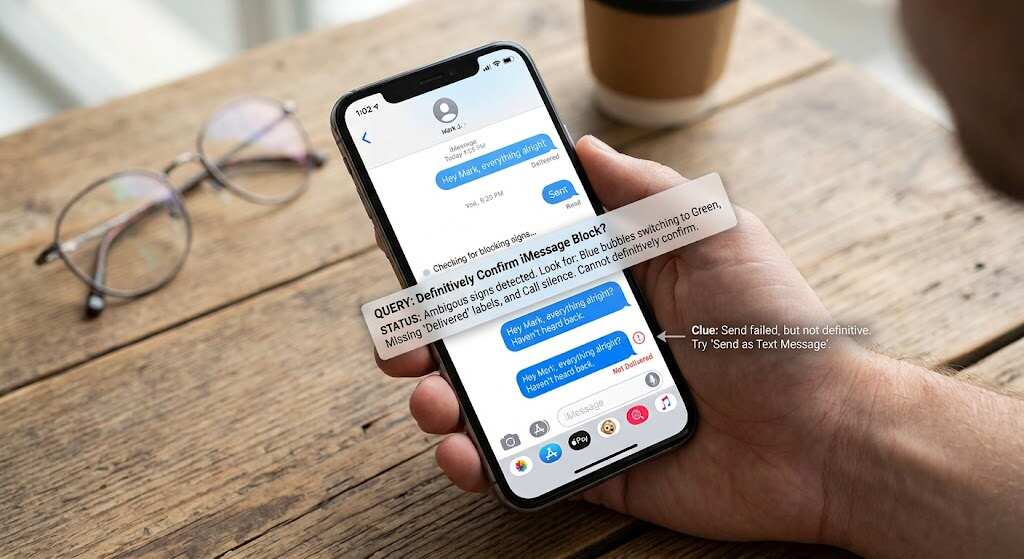
Apple says blocked communications are not delivered and the sender receives no blocking notification. That describes what blocking does, not a reliable test available on your phone.
The answer to “how to know if you’re blocked on imessage” therefore starts with a limitation: message colours, missing labels, and unanswered calls do not disclose someone’s block list.
First, separate the app from the service. Messages is the app; iMessage is Apple’s internet-based messaging option inside it. A blue outgoing bubble identifies iMessage, while other supported message types appear green.
Warning Signs Worth Checking
Delivery Information Changes
Open the conversation and inspect your latest outgoing message. An absent iMessage delivery status deserves troubleshooting, but Apple also documents sending failures caused by connection problems.
For “how to tell if someone blocked you on imessage,” the distinction matters: a delivery problem is visible; its cause may not be. Avoid treating either a missing label or “Delivered” as a complete diagnosis of someone’s current blocking settings.
A delivery acknowledgement is not a reading acknowledgement. “Delivered” does not establish that someone opened your message, and a receipt attached to an earlier message cannot establish their present settings. Read each label in context.
Blue Changes to Green
Wondering “how to tell if you’re blocked on imessage” after a colour change? A green text bubble indicates RCS, SMS, or MMS, rather than iMessage. Apple lists several explanations, including disabled iMessage, temporary unavailability, and a recipient without an Apple device.
Colour identifies the messaging service, not whether someone wants contact.
Read Confirmation Stops
A missing “Read” label cannot prove rejection. People can disable read receipts globally or for individual contacts.
If you typed “how to know if your blocked on imessag,” remember this distinction: delivery and reading are separate events. Without reading confirmation, you cannot know whether the message was opened.
Calls Reach Voicemail
If your calls go straight to voicemail, that is not a blocking verdict. Apple’s call-screening settings can silence unknown callers and send them there.
Searching “how to tell if you’re blocked on imessage” should not turn into repeated calls. Ring counts and unsuccessful FaceTime attempts are not Apple-issued block confirmations.
What Each Sign Actually Tells You
Use this summary instead of treating one symptom as proof.
| What you see | What it establishes | Confirms blocking? |
|---|---|---|
| Green bubble | RCS, SMS, or MMS | No |
| No delivery label | No displayed delivery confirmation | No |
| Not Delivered alert | Sending failed | No |
| No Read label | Reading is not confirmed | No |
The Technical Explanation

iMessage uses internet connectivity and Apple’s Push Notification service, or APNs. Apple Identity Service associates registered devices with a phone number or email address. The messages are end-to-end encrypted and delivered to the receivers. Only the sender and recipient can read them.
Each registered receiver receives an individual encoded version. That matters when someone uses both a phone and a computer: messaging is not limited to a single handset. Encryption protects message contents; it is not a block-detection feature.
Apple also documents queued delivery for offline devices. Consequently, delayed receipt is not uniquely explained by blocking.
That is the technical answer to “how to know if you’re blocked on imessage”: transport information describes message handling, not the recipient’s private decisions.
Also Read: Samsung Galaxy C55 5G Buying Guide: Is It Worth It?
Troubleshoot Without Overstepping
Start your “how to know if someone blocked you on imessage” check with your own device. Verify Wi-Fi or mobile data, restart your iPhone, and check Settings, then Apps, then Messages to confirm iMessage is enabled. Check Send & Receive for your specified number or email address.
Apple recommends checking connectivity and selecting Try Again after a red exclamation mark. Use this for legitimate troubleshooting, not repeatedly testing another person’s availability.
If several conversations fail, investigate your connection or messaging setup before focusing on one contact. If only one conversation fails, that narrows the affected conversation—not the explanation. Apple also recommends verifying the recipient’s phone number or email address.
If “notifications silenced” appears, it can reflect a shared Focus status, including Do Not Disturb. This concerns notification settings, not a blocking announcement.
For “how to tell if someone blocked you on imessage,” the sensible stopping point is equally important: do not switch numbers, conceal caller ID, or recruit others to bypass a possible boundary.
Conclusion
Messages can reveal failed sending, the service used, and available acknowledgements. They cannot conclusively reveal another person’s blocking settings. The honest answer to “how to know if your blocked on imessag” is to troubleshoot what you control, avoid treating silence as proof, and give the other person space.
Frequently Asked Questions
Does blocking carry across Apple devices?
Yes. Apple says a block applies to devices signed in to the same Apple Account.
Does being blocked on iPhone also block WhatsApp?
No. Third-party apps have separate blocking controls; an Apple block does not automatically create a WhatsApp block.
Can blocked contacts remain in shared group conversations?
Yes. Apple says you can share a Messages group with someone you blocked. Their messages cannot be seen, but they can see your messages.
Does reporting junk automatically block its sender?
No. Reporting and blocking are separate actions. Apple says reporting spam does not prevent the sender from sending more messages.
Does unblocking in one Apple app affect others?
Yes. Apple documents unblocking across Phone, FaceTime, Messages, and Mail when a contact is unblocked in one of those apps.
